
Billing & Pricing
This guide covers BOOKIN pricing plans, how to manage your billing, upgrade or downgrade your plan, and understand your subscription details.
Pricing Page
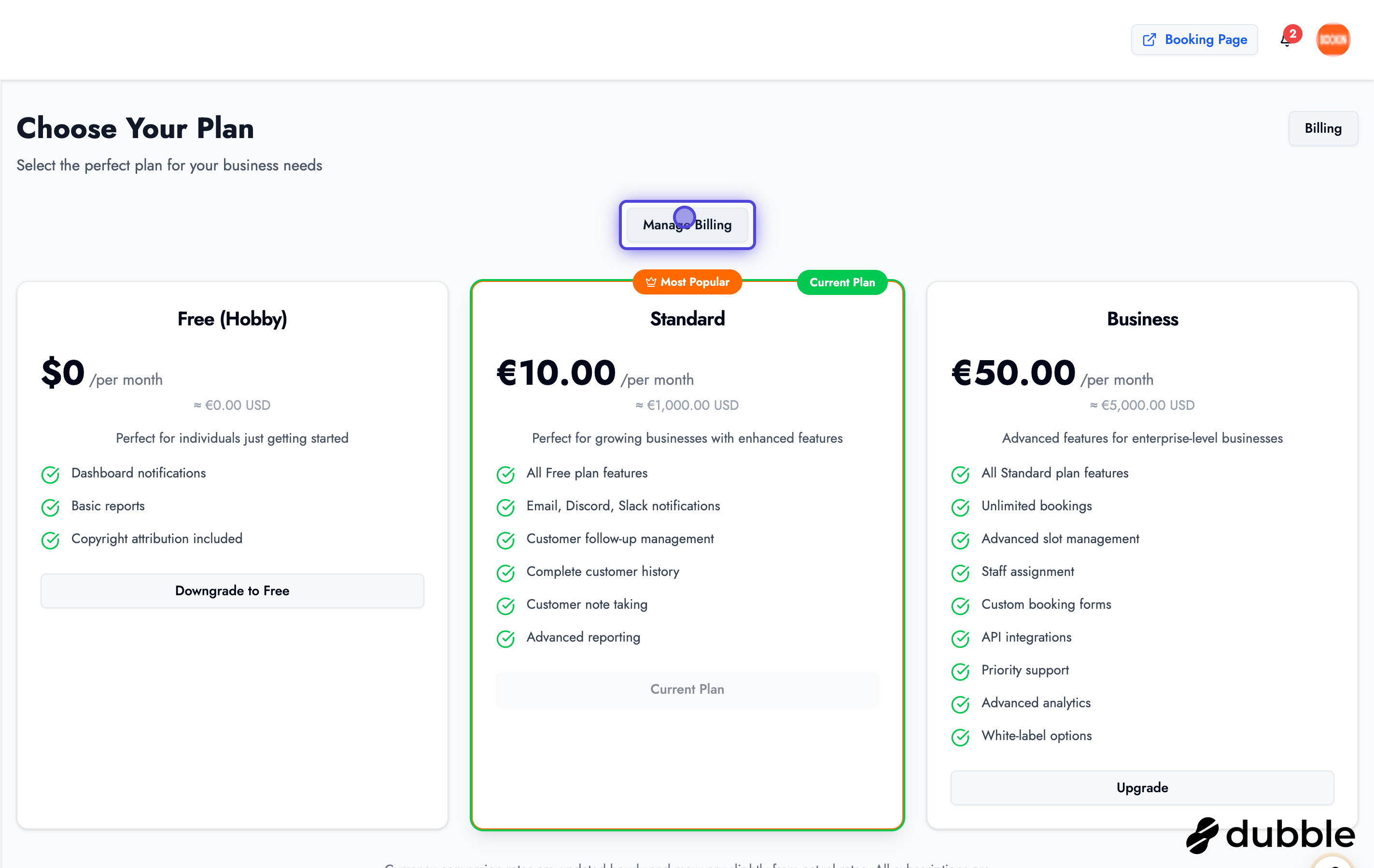
Section titled “Pricing Page”The pricing page displays all available subscription plans and their features.
Viewing Available Plans
Section titled “Viewing Available Plans”- Navigate to the Pricing page
- You’ll see all available plans with:
- Plan names and descriptions
- Feature comparisons
- Pricing information
- Plan benefits
Current Plan
Section titled “Current Plan”Your current plan will be highlighted or marked clearly:
- See which plan you’re currently subscribed to
- Compare your plan with other available options
- Understand what features you have access to
Managing Billing
Section titled “Managing Billing”Accessing Billing Details
Section titled “Accessing Billing Details”From the pricing page or dashboard:
- Click “Manage Billing” or “Billing” button (usually in the top left)
- You’ll be taken to your billing management page
- View your subscription details
Billing Information
Section titled “Billing Information”Your billing page shows:
- Current Plan: Which plan you’re subscribed to
- Billing Cycle: Monthly or annual billing
- Next Billing Date: When your next payment is due
- Payment Method: Your current payment method
- Billing History: Past invoices and payments
Plan Features
Section titled “Plan Features”Different plans offer different features and limits:
Common Plan Tiers
Section titled “Common Plan Tiers”Free/Starter Plan:
- Basic booking features
- Limited number of appointments
- Essential customer management
Standard Plan:
- Enhanced features
- More appointments
- Advanced time slot management (up to 3 months)
- Additional team members
Professional Plan:
- Full feature access
- Unlimited appointments
- Extended time slot management
- Priority support
Enterprise Plan:
- Custom features
- Unlimited everything
- Dedicated support
- Custom integrations
Plan Limits
Your plan determines limits such as:
- Number of time slots you can create in advance
- Number of team members
- Storage capacity
- Advanced features availability
Upgrading Your Plan
Section titled “Upgrading Your Plan”If you need more features or higher limits:
- Navigate to the Pricing page
- Review available plans
- Select the plan you want to upgrade to
- Click “Upgrade” or “Select Plan”
- Complete the payment process
- Your new plan will be activated immediately
Benefits of Upgrading
Section titled “Benefits of Upgrading”- More Features: Access to advanced features
- Higher Limits: Increased capacity for appointments and slots
- Better Support: Priority customer support
- Additional Team Members: Invite more staff members
Downgrading Your Plan
Section titled “Downgrading Your Plan”If you want to switch to a lower-tier plan:
- Go to your billing management page
- Select “Change Plan” or “Downgrade”
- Choose the plan you want to switch to
- Confirm the change
- Your plan will change at the end of your current billing cycle
Downgrade Considerations
- Some features may become unavailable
- Limits may be reduced
- Changes take effect at the end of your billing period
- Review what you’ll lose before downgrading
Payment Management
Section titled “Payment Management”Updating Payment Method
Section titled “Updating Payment Method”- Access your billing settings
- Click “Update Payment Method” or “Change Payment”
- Enter your new payment information
- Save the changes
- Future payments will use the new method
Viewing Billing History
Section titled “Viewing Billing History”Access your billing history to:
- View past invoices
- Download receipts
- Track payment history
- Review subscription changes
Subscription Management
Section titled “Subscription Management”Canceling Subscription
Section titled “Canceling Subscription”If you need to cancel your subscription:
- Go to billing management
- Find “Cancel Subscription” option
- Follow the cancellation process
- Your subscription will remain active until the end of the billing period
- You’ll retain access until the period ends
Reactivating Subscription
Section titled “Reactivating Subscription”If you’ve canceled and want to reactivate:
- Navigate to the pricing page
- Select a plan
- Complete the payment process
- Your subscription will be reactivated
Understanding Your Bill
Section titled “Understanding Your Bill”What’s Included
Section titled “What’s Included”Your subscription typically includes:
- Platform access
- Core booking features
- Customer management
- Basic analytics
- Email support (varies by plan)
Additional Costs
Section titled “Additional Costs”Be aware of potential additional costs:
- Transaction fees (if applicable)
- Premium features (if not included in your plan)
- Additional team members (beyond plan limit)
- Custom integrations (enterprise plans)
Best Practices
Section titled “Best Practices”Billing Management Tips
Section titled “Billing Management Tips”- Review Regularly: Check your billing status monthly
- Understand Limits: Know what your plan includes
- Plan Ahead: Upgrade before hitting limits
- Keep Payment Updated: Ensure payment method is current
- Save Receipts: Download invoices for your records
- Monitor Usage: Track your usage against plan limits
Choosing the Right Plan
Section titled “Choosing the Right Plan”Consider these factors:
- Business Size: Number of appointments you handle
- Team Size: How many staff members need access
- Features Needed: Which features are essential
- Growth Plans: Plan for future expansion
- Budget: What you can afford monthly/yearly
Getting Help
Section titled “Getting Help”If you have billing questions:
- Billing Support: Contact support for billing inquiries
- Plan Questions: Ask about plan features and limits
- Payment Issues: Get help with payment problems
- Upgrade Assistance: Get guidance on choosing the right plan
Next Steps
Section titled “Next Steps”After managing your billing:
- Explore settings - Configure your account
- Set up services - Create your service offerings
- Configure business hours - Set your availability
Related Guides
Section titled “Related Guides”- Settings & Configuration - Configure your account settings
- Dashboard Overview - Navigate your dashboard
- Managing Services - Set up services for customers